LaTeX Tutorial
安装
第一步:安装 LaTeX 编译环境;第二步:安装 LaTeX 编辑器。
-
编译环境可以选择 Tex Live 或 MiKTeX。二者的差别在于 Tex Live 安装文件远大于 MiKTeX,原因在于 TeX Live 中已经包含了绝大多数编译
.tex文件所需的 package,而 MiKTex 中只包含了一些基础的 package,当编译过程中需要一些特定的 package 时,需要即用即下载。 -
编辑器可以选择 TeXstudio, TeXMaker, LyX 等,根据个人的使用经验,推荐 TeXstudio 作为首选的编辑器。
将以上所需的工具下载之后,首先安装编译环境,然后再安装编辑器,过程中按照软件提示即可,一般无需多余的配置。(备注:安装软件时,推荐以管理员身份运行)
使用
编译器配置
完成以上安装后,打开 TeXstudio 后,首先需要对该编辑器进行一些简单的配置。
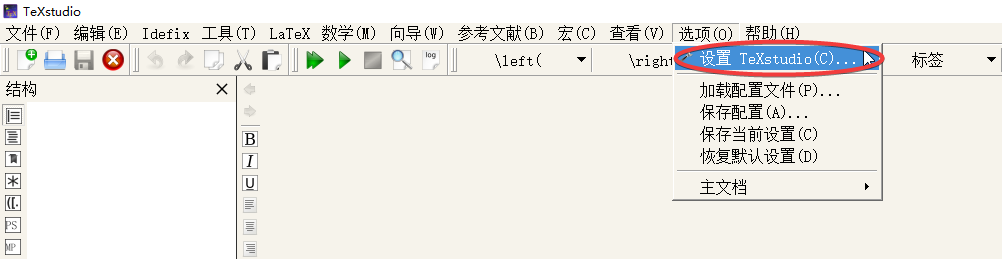
按照下图,从工具栏 --> 选项 --> 设置 TeXstudio 进入配置界面。
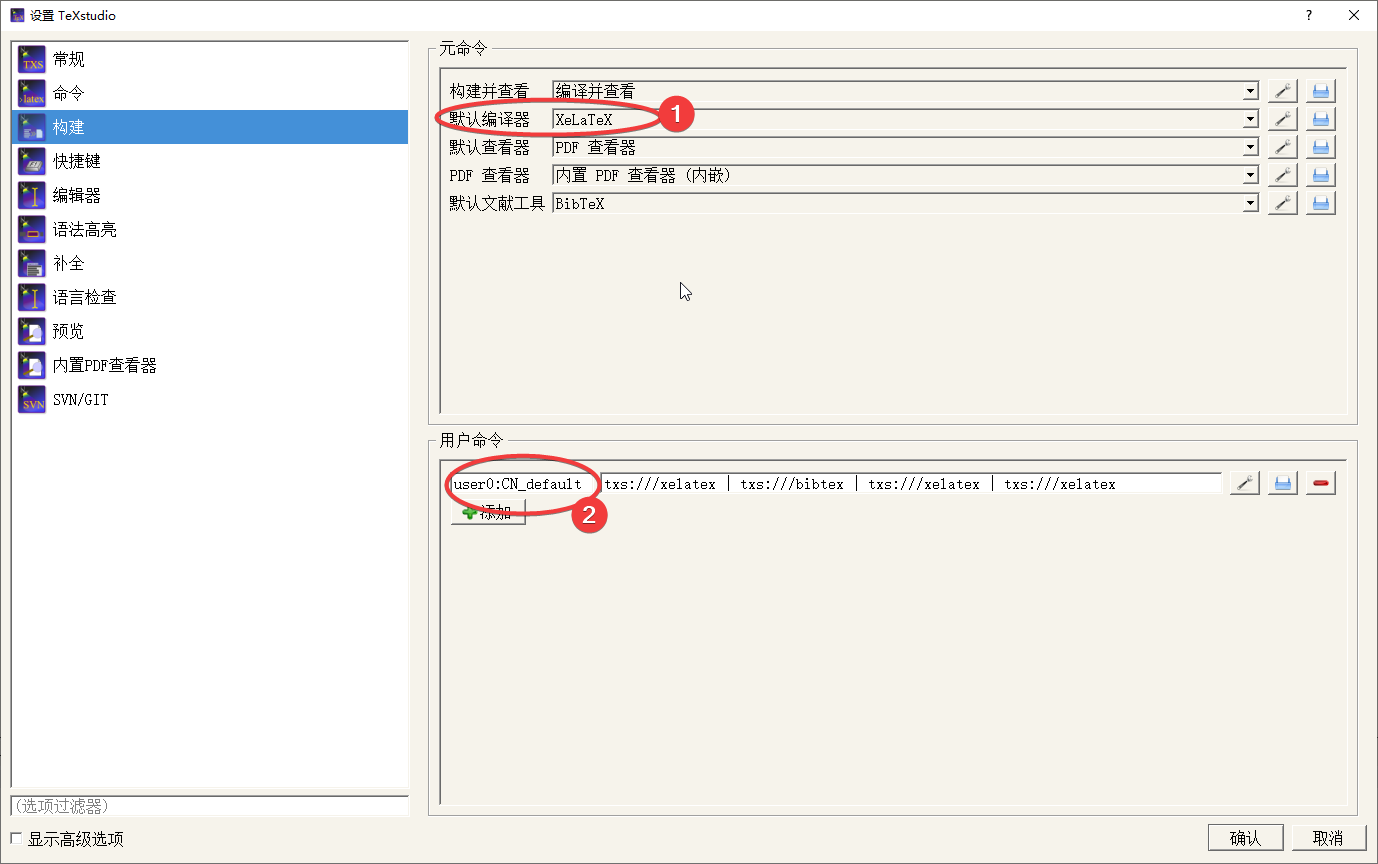
主要对下图中 构建 选项卡进行修改。
- 当需要编译中文文档时,默认编译器需要设置为
XeLaTeX;(如下图中标记1处) - 当只编译中文文档时,默认编译器可以设置为
LaTeX或pdfLaTeX;
一些 .tex 文件在编译时需要使用不同的编译器进行多次编译才能成功,TeXstudio 中用户可以自定义编译命令,如下图中标记2处。
其次,需要对编辑器选项卡进行修改,将默认字体编码设置为UTF-8。
备注:以上设置比较简单,但足够对文档进行正常编译,更多设置可以自行摸索。
文件与语法
常用的 文件包括 .cls,.sty,.tex,.bib,分别对应 class,package,文档和参考文献。
导言区
文档类别
{ }中设置本文档的 class,也可以是 article, beamer 或其他自定义 class 等,[ ] 中对 class 进行设置。
\documentclass[12pt, a4paper]{book}文档名
\title{xxxx}文档日期
\date{xxxx}文档作者与隶属单位
\author{xxxx \thanks{xxxx}}中文字体,xeCJK包
\usepackage{xeCJK}
\setCJKmainfont{SimSun}    % 正文字体
\setCJKmonofont{SimHei}    % 等宽字体
\setCJKsansfont{FangSong} % 衬线字体英文字体,fontspec 包
\usepackage{fontspec}
\setmainfont{Times New Roman}    % 正文字体
\setmonofont{Courier New}    % 等宽字体
\setsansfont{Cambria}    % 衬线字体
设置脚注
\usepackage[perpage, marginal]{footmisc}    % perpage 每页重新编号;marginal 没有缩进;
\setlength{\footnotesep}{0.5cm} % 设置脚注间距
\setlength{\skip\footins}{2cm} % 设置脚注区域与文本区域的间距
参考文献格式
\usepackage{natbib}
\bibliographystyle{unsrt}    % 设置参考文献编号格式
列表格式
\usepackage{enumitem}
\setlist{nosep}
\setlist[enumerate]{labelindent=\parindent, leftmargin=2em}
图片格式
\usepackage{graphicx}
\graphicspath{{figure/}}    % 图片路径为 figure
\usepackage{subfigure}    % 设置 subfigure
纸张大小与页边距
\usepackage{geometry}
\geometry{a4paper,left=2cm,right=2cm,top=2cm,bottom=2cm}
段落缩进
\usepackage{indentfirst}
\setlength{\parindent}{2em}    % 设置首行缩进为2字符
行间距
\linespread{1.5}超链接
\usepackage[colorlinks=true,linkcolor=blue,urlcolor=blue,citecolor=cyan]{hyperref} % 超链接正文
\begin{document}
这里是正文。
\end{document}
页码格式
% 类型一:页码格式设置为罗马数字
\pagestyle{headings}
\pagenumbering{Roman}
% 类型二:正文使用阿拉伯数字标记页码
\pagestyle{plain}
\pagenumbering{arabic}
段落缩进
% 设置缩进,如果导言区已经设置,则不需要再对缩进进行设置
\indent
% 设置为不缩进
\noindent
插入图片
% 只需要设置一张图时,需要在文中输入的内容:
\begin{figure}[htbp]
\centering
\includegraphics[ xxx ]{ xxx }    % `[ ]`中设置参数,`{ }`中输入文件名
\caption{ xxx }    % `{ }` 中输入显示的文字
\label{xxx}    % 标签设置,用于交叉引用
\end{figure}
% 在一行中,并列显示一些图像,下面以两幅图为例
\begin{figure}[htbp]
\centering
\subfigure[ xxx ]{ % []中输入在小图中显示的文字
\includegraphics[ xxx ]{ xxx } % []中输入参数,如宽度等,{}中输入文件名
}
\subfigure[ xxx ]{ % []中输入在小图中显示的文字
\includegraphics[ xxx ]{ xxx } % []中输入参数,如宽度等,{}中输入文件名
}
\caption{ xxx } % {}中输入整体显示的文字
\label{ xxx } %{}中输入标签
\end{figure}下一页
\newpage公式
行内公式,直接使用 $ input formula here $ 即可。
行间公式,使用如下形式:
\begin{equation}\label{user define label} % label for cross referencing
\frac{\partial}{\partial t}(\rho \mathbf{u})+\nabla \cdot(\rho \mathbf{u} \otimes \mathbf{u})=-\nabla \overline{p}+\mu \nabla^{2} \mathbf{u}+\frac{1}{3} \mu \nabla(\nabla \cdot \mathbf{u})+\rho \mathbf{g}
\end{equation}
借助一些工具可以快速生成 公式,如 Mathpix Snip, LaTeX公式编辑器等。
表格
\begin{table}[ht]
\caption{Table Name}
\centering
\begin{tabular}{p{0.2\textwidth} p{0.5\textwidth} p{0.2\textwidth}}    % 设置列宽,超过此宽度自动换行
\hline\hline
Deadline & Task & Note \\
user define & user define & user define \\
user define & user define & user define \\
\hline
\end{tabular}
\label{table01}
\end{table}
% 跨页表格
% 需要在导言区输入
\usepackage{longtable}
% 以下是正文中的示例
\begin{longtable}{p{0.2\textwidth} p{0.5\textwidth} p{0.2\textwidth}} % p for column width configure
\hline\hline
Name & Property & Provider \\
latex & latex & latex \\
\endhead
latex & latex & latex \\
\hline
\caption{This is the caption}
\label{longtable01}
\end{longtable}备注:对于一些复杂的表格,可以借助一些工具自动生成,如 Tabels Generator。
引用
\begin{verse}
\centering
\textbf{Principles are ways of successfully dealing with reality to get what you want out of life.}\\
\hfill \emph{Ray Dalio}
\end{verse}
交叉引用
\ref{ }插入横线
\noindent
\rule{\textwidth}{1mm}
编译
含 Bibtex
使用 Bibtex 的情况,一般除了主文件外,还有 .bib 文件。
需要进行四次编译 Latex->Bibtex->Latex->Latex,如果使用了 xeCJK 包,将 Latex 替换为 XeLatex 即可。
不含 Bibtex
直接使用 Latex/XeLatex 编译即可,一次不成功的话,多编译几次。
一个例子
百度网盘链接:https://pan.baidu.com/s/1HJ8KWHLgVq2rPrvoV2db0Q 提取码: i4cq
LaTeX 模板
Elegantpaper
问题描述与解决方案
近期找到了一个非常欣赏、符合审美的中文模板 Elegantpaper,在使用的过程中非常流畅。
然而今天遇到这样一个问题:在 Win10 上编译很好的文件转移到 Mac 上出现了很多的问题,一时相当懵逼。
经过一番摆弄,发现是 Font 的问题,于是对 .cls 文件进行了少许的修改,实现同样的 TeX 文件可以在 Win10 和 Mac 上都可以正常编译。
修改的内容如下:
- 将原始
.cls文件中的字体选项founder删除。 - 增加字体选项:
Win-default
%font name got from cmd->"fc-list :lang=zh"
%use default Chinese font pre-installed in Win10 OS, e.g. SimHei, KaiTi, SimSun, FangSong
	\ifdefstring{\ELEGANT@chinesefont}{Win-default}{
		\RequirePackage[UTF8,scheme=plain,fontset=none]{ctex}
		\setCJKmainfont[BoldFont={SimHei},ItalicFont={KaiTi}]{SimSun}
		\setCJKsansfont[BoldFont={SimHei},ItalicFont={SimHei}]{SimHei}
		\setCJKmonofont[BoldFont={SimHei},ItalicFont={SimHei}]{FangSong}
		\setCJKfamilyfont{zhsong}{SimSun}
		\setCJKfamilyfont{zhhei}{SimHei}
		\setCJKfamilyfont{zhkai}{KaiTi}
		\setCJKfamilyfont{zhfs}{FangSong}
		\newcommand*{\songti}{\CJKfamily{zhsong}}
		\newcommand*{\heiti}{\CJKfamily{zhhei}}
		\newcommand*{\kaishu}{\CJKfamily{zhkai}}
\newcommand*{\fangsong}{\CJKfamily{zhfs}}}{\relax}- 增加字体选项:
Mac-default
%used in Mac system, with Founder fonts manually installed
%founder fonts: FZHT, FZSS, FZFS, FZKT
	\ifdefstring{\ELEGANT@chinesefont}{Mac-founder}{
		\RequirePackage[UTF8,scheme=plain,fontset=none]{ctex}
		\setCJKmainfont[BoldFont={FZHTK--GBK1-0},ItalicFont={FZKTJW--GB1-0}]{FZSSK--GBK1-0}
		\setCJKsansfont[BoldFont={FZHTK--GBK1-0},ItalicFont={FZHTK--GBK1-0}]{FZHTK--GBK1-0}
		\setCJKmonofont[BoldFont={FZHTK--GBK1-0},ItalicFont={FZHTK--GBK1-0}]{FZFSK--GBK1-0}
		\setCJKfamilyfont{zhsong}{FZSSK--GBK1-0}
		\setCJKfamilyfont{zhhei}{FZHTK--GBK1-0}
		\setCJKfamilyfont{zhkai}{FZKTJW--GB1-0}
		\setCJKfamilyfont{zhfs}{FZFSK--GBK1-0}
		\newcommand*{\songti}{\CJKfamily{zhsong}}
		\newcommand*{\heiti}{\CJKfamily{zhhei}}
		\newcommand*{\kaishu}{\CJKfamily{zhkai}}
		\newcommand*{\fangsong}{\CJKfamily{zhfs}}}{\relax}
备注:上述字体也可以自行设置。
TeX 文件设置
对于同一个TeX文件,
- 当在 Win10 环境下编译时,导言区设置如下:
\documentclass[lang=cn, 12pt, a4paper, cite=super, chinesefont=Win-default]{elegantpaper}- 当在 Mac 环境下编译时,导言区设置如下:
\documentclass[lang=cn, 12pt, a4paper, cite=super, chinesefont=Mac-default]{elegantpaper}附录
修改后的完整.cls代码如下:
% Modified by Chuang Li [www.lichuang.me]
% Author: Dongsheng Deng
% Homepage: https://ddswhu.me/
% Email: elegantlatex2e@gmail.com
% Lastest Version: https://github.com/ElegantLaTeX/ElegantPaper

% --- Class structure: identification part
\ProvidesClass{elegantpaper}[2020/04/12 v0.09 ElegantLaTeX Paper class]
\NeedsTeXFormat{LaTeX2e}

\RequirePackage{kvoptions}
\RequirePackage{etoolbox}
\RequirePackage{calc}

\SetupKeyvalOptions{family=ELEGANT, prefix=ELEGANT@, setkeys=\kvsetkeys}
\newcommand{\ekv}[1]{\kvsetkeys{ELEGANT}{#1}}

\DeclareStringOption[en]{lang}
\DeclareVoidOption{cn}{\ekv{lang=cn}}
\DeclareVoidOption{en}{\ekv{lang=en}}

\DeclareStringOption[cm]{math}

\DeclareStringOption[numbers]{cite}
\DeclareVoidOption{numbers}{\ekv{cite=numbers}}
\DeclareVoidOption{authoryear}{\ekv{cite=authoryear}}
\DeclareVoidOption{super}{\ekv{cite=super}}

\DeclareStringOption[apalike]{bibstyle}

\DeclareStringOption[ctexfont]{chinesefont}
\DeclareVoidOption{ctexfont}{\ekv{chinesefont=ctexfont}}
\DeclareVoidOption{founder}{\ekv{chinesefont=founder}}
\DeclareVoidOption{nofont}{\ekv{chinesefont=nofont}}

\DeclareVoidOption{newtx}{\ekv{math=newtx}}
\DeclareVoidOption{mtpro2}{\ekv{math=mtpro2}}
\DeclareVoidOption{cm}{\ekv{math=cm}}

\DeclareDefaultOption{\PassOptionsToClass{\CurrentOption}{article}}
\ProcessKeyvalOptions*\relax
\LoadClass{article}

\RequirePackage{hyperref}
\hypersetup{
	pdfborder={0 0 0},
	colorlinks=true,
	linkcolor={winered},
	urlcolor={winered},
	filecolor={winered},
	citecolor={winered},
	linktoc=all,
}
% settings for the hyperref and geometry
\RequirePackage[
left=1in,
right=1in,
top=1in,
bottom=1in,
headheight=0pt,
headsep=0pt]{geometry}
\setlength{\headsep}{5pt}

\RequirePackage{amsthm}
\RequirePackage{amsmath}
\RequirePackage{amssymb}
\RequirePackage{indentfirst}
\RequirePackage{booktabs}
\RequirePackage{multicol}
\RequirePackage{multirow}
% \RequirePackage{linegoal}
\RequirePackage{xcolor}
\RequirePackage{graphicx}
\RequirePackage{fancyvrb}
\RequirePackage{abstract}
\RequirePackage{hologo}

\linespread{1.35}
\graphicspath{{image/}{figure/}{fig/}{img/}}

% caption settings
\RequirePackage[font=small,labelfont={bf}]{caption}
\captionsetup[table]{skip=3pt}
\captionsetup[figure]{skip=3pt}

% list/itemize/enumerate setting
\RequirePackage[shortlabels,inline]{enumitem}
\setlist{nolistsep}


% define the hyperref color
\RequirePackage{xcolor}
\definecolor{winered}{rgb}{0.5,0,0}

\definecolor{lightgrey}{rgb}{0.95,0.95,0.95}
\definecolor{commentcolor}{RGB}{0,100,0}
\definecolor{frenchplum}{RGB}{190,20,83}


% add the email cmd
\newcommand\email[1]{\href{mailto:#1}{\nolinkurl{#1}}}

% font settings

\PassOptionsToPackage{no-math}{fontspec}
\ifdefstring{\ELEGANT@lang}{cn}{
	\ifXeTeX
%font name got from cmd->"fc-list :lang=zh"
%use default Chinese font pre-installed in Win10 OS, e.g. SimHei, KaiTi, SimSun, FangSong
	\ifdefstring{\ELEGANT@chinesefont}{Win-default}{
		\RequirePackage[UTF8,scheme=plain,fontset=none]{ctex}
		\setCJKmainfont[BoldFont={SimHei},ItalicFont={KaiTi}]{SimSun}
		\setCJKsansfont[BoldFont={SimHei},ItalicFont={SimHei}]{SimHei}
		\setCJKmonofont[BoldFont={SimHei},ItalicFont={SimHei}]{FangSong}
		\setCJKfamilyfont{zhsong}{SimSun}
		\setCJKfamilyfont{zhhei}{SimHei}
		\setCJKfamilyfont{zhkai}{KaiTi}
		\setCJKfamilyfont{zhfs}{FangSong}
		\newcommand*{\songti}{\CJKfamily{zhsong}}
		\newcommand*{\heiti}{\CJKfamily{zhhei}}
		\newcommand*{\kaishu}{\CJKfamily{zhkai}}
		\newcommand*{\fangsong}{\CJKfamily{zhfs}}}{\relax}

%used in Mac system, with Founder fonts manually installed
%founder fonts: FZHT, FZSS, FZFS, FZKT
	\ifdefstring{\ELEGANT@chinesefont}{Mac-founder}{
		\RequirePackage[UTF8,scheme=plain,fontset=none]{ctex}
		\setCJKmainfont[BoldFont={FZHTK--GBK1-0},ItalicFont={FZKTJW--GB1-0}]{FZSSK--GBK1-0}
		\setCJKsansfont[BoldFont={FZHTK--GBK1-0},ItalicFont={FZHTK--GBK1-0}]{FZHTK--GBK1-0}
		\setCJKmonofont[BoldFont={FZHTK--GBK1-0},ItalicFont={FZHTK--GBK1-0}]{FZFSK--GBK1-0}
		\setCJKfamilyfont{zhsong}{FZSSK--GBK1-0}
		\setCJKfamilyfont{zhhei}{FZHTK--GBK1-0}
		\setCJKfamilyfont{zhkai}{FZKTJW--GB1-0}
		\setCJKfamilyfont{zhfs}{FZFSK--GBK1-0}
		\newcommand*{\songti}{\CJKfamily{zhsong}}
		\newcommand*{\heiti}{\CJKfamily{zhhei}}
		\newcommand*{\kaishu}{\CJKfamily{zhkai}}
		\newcommand*{\fangsong}{\CJKfamily{zhfs}}}{\relax}

	\ifdefstring{\ELEGANT@chinesefont}{nofont}{
		\RequirePackage[UTF8,scheme=plain,fontset=none]{ctex}}{\relax}

	\ifdefstring{\ELEGANT@chinesefont}{ctexfont}{
		\RequirePackage[UTF8,scheme=plain]{ctex}}{\relax}
	\else
	\ifdefstring{\ELEGANT@chinesefont}{ctexfont}{
		\RequirePackage[UTF8,scheme=plain]{ctex}}{\relax}
	\fi
	\AfterEndPreamble{
		% \renewcommand{\itshape}{\kaishu}
		\setlength\parindent{2\ccwd}}}{\relax}

\ifcsname kaishu\endcsname
\newcommand{\citshape}{\kaishu}
\else
\newcommand{\citshape}{\itshape}
\fi
\ifcsname kaishu\endcsname
\newcommand{\cnormal}{\kaishu}
\else
\newcommand{\cnormal}{\normalfont}
\fi

\ifcsname fangsong\endcsname
\newcommand{\cfs}{\fangsong}
\else
\newcommand{\cfs}{\normalfont}
\fi

\RequirePackage{newtxtext}
\ifdefstring{\ELEGANT@math}{newtx}{
	\RequirePackage{newtxmath}
	\let\Bbbk\relax
	\RequirePackage{esint}
	%%% use yhmath pkg, uncomment following code
	% \let\oldwidering\widering
	% \let\widering\undefined
	% \RequirePackage{yhmath}
	% \let\widering\oldwidering

	%%% use esvect pkg, uncomment following code
	% \RequirePackage{esvect}

	\DeclareSymbolFont{CMlargesymbols}{OMX}{cmex}{m}{n}
	\let\sumop\relax\let\prodop\relax
	\DeclareMathSymbol{\sumop}{\mathop}{CMlargesymbols}{"50}
	\DeclareMathSymbol{\prodop}{\mathop}{CMlargesymbols}{"51}
}{\relax}

\RequirePackage{appendix}

\ifdefstring{\ELEGANT@lang}{cn}{
	\theoremstyle{plain}% default
	\newtheorem{theorem}{定理}[section] %
	\newtheorem{lemma}[theorem]{引理} %
	\newtheorem{proposition}[theorem]{命题} %
	\newtheorem*{corollary}{推论} %
	\theoremstyle{definition} %
	\newtheorem{definition}{定义}[section] %
	\newtheorem{conjecture}{猜想}[section] %
	\newtheorem{example}{例}[section] %
	\theoremstyle{remark} %
	\newtheorem*{remark}{\normalfont\bfseries 评论} %
	\newtheorem*{note}{\normalfont\bfseries 注} %
	\newtheorem{case}{\normalfont\bfseries 案例} %
	\renewcommand*{\proofname}{\normalfont\bfseries 证明} %
	\renewcommand\contentsname{目录}
	\renewcommand\refname{参考文献} %
	\renewcommand\figurename{图} %
	\renewcommand\tablename{表}%
	\newcommand\versiontext{版本:}%
	\newcommand\updatetext{日期:}%
	\renewcommand\abstractname{摘\hspace{2em}要}
	\setlength\parindent{2\ccwd}
	\renewcommand{\abstracttextfont}{\small\citshape\noindent\ignorespaces}
	% 新定义命令
	\newcommand{\keywords}[1]{\vskip2ex\par\noindent\normalfont{\bfseries 关键词: } #1}
	\newcommand\figref[1]{{\bfseries 图~\ref{#1}}}
	\newcommand\tabref[1]{{\bfseries 表~\ref{#1}}}
	\RequirePackage{gbt7714}
	\ifdefstring{\ELEGANT@cite}{authoryear}{
		\bibliographystyle{gbt7714-author-year}}{
		\bibliographystyle{gbt7714-numerical}}
	\ifdefstring{\ELEGANT@cite}{numbers}{
		\citestyle{numbers}}{\relax}
	\renewcommand{\appendixtocname}{附录}
	\renewcommand{\appendixpagename}{附录}}{\relax}

\ifdefstring{\ELEGANT@lang}{en}{
	\theoremstyle{plain}% default
	\newtheorem{theorem}{Theorem}[section] %
	\newtheorem{lemma}[theorem]{Lemma} %
	\newtheorem{proposition}[theorem]{Proposition} %
	\newtheorem*{corollary}{Corollary} %
	\theoremstyle{definition} %
	\newtheorem{definition}{Definition}[section] %
	\newtheorem{conjecture}{Conjecture}[section] %
	\newtheorem{example}{Example}[section] %
	\theoremstyle{remark} %
	\newtheorem*{remark}{Remark} %
	\newtheorem*{note}{Note} %
	\newtheorem{case}{Case} %
	\renewcommand*{\proofname}{\normalfont\bfseries Proof}%
	\newcommand\versiontext{\itshape Version: }%
	\newcommand\updatetext{\itshape Date: }%
	\setlength\parindent{2em}
	\renewcommand{\abstracttextfont}{\sffamily\small\noindent\ignorespaces}
	% newcommands defined in this template.
	\newcommand{\keywords}[1]{\vskip 2ex\par\noindent\normalfont{\bfseries Keywords: } #1}
	\newcommand\figref[1]{{\bfseries Figure~\ref{#1}}}
	\newcommand\tabref[1]{{\bfseries Table~\ref{#1}}}
	\RequirePackage[\ELEGANT@cite,sort&compress]{natbib}
	\bibliographystyle{\ELEGANT@bibstyle}}{\relax}

\setlength{\bibsep}{0.0pt}
\def\bibfont{\footnotesize}

\AtBeginEnvironment{verbatim}{\microtypesetup{activate=false}}
\BeforeBeginEnvironment{tabular}{\small}
\AfterEndEnvironment{tabular}{}

\AtBeginDocument{
	\setlength{\abovedisplayskip}{3pt}
	\setlength{\belowdisplayskip}{3pt}
	\RequirePackage[flushmargin]{footmisc}
	\setlength{\footnotesep}{12pt}}

\def\IfEmpty#1{%
	\edef\1{\the#1}
	\ifx\1\empty
}
\newtoks\version
\newtoks\institute

\renewcommand\maketitle{\par
	\begingroup
	\renewcommand\thefootnote{\@fnsymbol\c@footnote}%
	\def\@makefnmark{\rlap{\@textsuperscript{\normalfont\@thefnmark}}}%
	\long\def\@makefntext##1{\parindent 1em\noindent
		\hb@xt@0.1em{%
			\hss\@textsuperscript{\normalfont\@thefnmark}}##1}%
	\if@twocolumn
	\ifnum \col@number=\@ne
	\@maketitle
	\else
	\twocolumn[\@maketitle]%
	\fi
	\else
	\newpage
	\global\@topnum\z@   % Prevents figures from going at top of page.
	\@maketitle
	\fi
	\thispagestyle{plain}\@thanks
	\endgroup
	\setcounter{footnote}{0}%
	\global\let\thanks\relax
	\global\let\maketitle\relax
	\global\let\@maketitle\relax
	\global\let\@thanks\@empty
	\global\let\@author\@empty
	\global\let\@ELEGANT@version\@empty
	\global\let\@date\@empty
	\global\let\@title\@empty
	\global\let\title\relax
	\global\let\author\relax
	\global\let\date\relax
	\global\let\and\relax
	\global\let\ELEGANT@version\relax
}
\def\@maketitle{%
	\newpage
	\null
	\vskip 2em%
	\begin{center}%
		\let \footnote \thanks
		{\LARGE\bfseries \@title \par}%
		\vskip 1.5em%
		{\large
			\lineskip .5em%
			\begin{tabular}[t]{c}%
				\@author\\[1ex]
			\end{tabular}\par}
		\the\institute%
		\vskip 0.5ex%
		\IfEmpty\version
		\else
		{\small\normalfont\citshape\versiontext\the\version}
		\fi
		\ifx\@date\empty
		\else
		\vskip 0.1em%
		{\small\normalfont\citshape\updatetext\@date}%
		\fi
	\end{center}%
	\par
}


\RequirePackage{listings}
\renewcommand{\ttdefault}{cmtt}

\lstdefinestyle{estyle}{
	basicstyle=%
	\ttfamily
	\lst@ifdisplaystyle\footnotesize\fi
}
\lstset{basicstyle=\scriptsize\ttfamily,style=estyle}

\lstset{language=[LaTeX]TeX,
	texcsstyle=*\color{winered},
	numbers=none,
	breaklines=true,
	keywordstyle=\color{winered},
	frame=tlbr,framesep=4pt,framerule=0pt,
	commentstyle=\color{commentcolor},
	emph={elegantpaper,fontenc,fontspec,xeCJK,FiraMono,xunicode,newtxmath,figure,fig,image,img,table,itemize,enumerate,newtxtext,newtxtt,ctex,microtype,description,times,newtx,booktabs,tabular,PDFLaTeX,XeLaTeX,type1cm,BibTeX,cite,gbt7714,lang},
	emphstyle={\color{frenchplum}},
	morekeywords={DeclareSymbolFont,SetSymbolFont,toprule,midrule,bottomrule,institute,version,includegraphics,setmainfont,setsansfont,setmonofont ,setCJKmainfont,setCJKsansfont,setCJKmonofont,RequirePackage,figref,tabref,email,maketitle,keywords,zhdate,zhtoday},
	tabsize=2,
	backgroundcolor=\color{lightgrey}
}